SysSerialPort, manage serial port
Questo blocco funzione gestisce la comunicazione su porta seriale, occorre definire in COM la porta da gestire fornendo tutti i parametri di configurazione. Se non sono definiti parametri la porta verrà impostata di default a 19200, e, 8, 1, DTR_AUTO_WO_TIMES.
Attivando il comando Open la porta viene aperta se non ci sono problemi viene attivato Opened e sull'uscita File viene ritornato lo stream da utilizzarsi per lo scambio dati sulla porta. Se ci sono errori nei parametri o con la porta definita viene generato Fault.
Per aggiungere porte seriali ai nostri moduli CPU è possibile utilizzare convertitori USB/Seriale sui moduli basati su Linux e convertitori Ethernet/Seriale sui moduli ARM e Cortex, vedi articolo.
Approfondimenti
- Per gestire lo stream di I/O eFILEP in uscita dal FB puoi utilizzare gli oggetti di gestione dei terminali (Streams) di I/O.
- In questo articolo un programma di esempio per lo sviluppo di un driver di comunicazione seriale.
Riportiamo un programma che gestisce un semplice protocollo seriale, viene ricevuta una stringa con 2 valori REAL. I valori ricevuti sono decodificati e ritornati in risposta.
LogicLab (Ptp116, ST_SerialDataReceive) Semplice protocollo seriale
PROGRAM ST_SerialDataReceive
VAR
    Ch : BYTE; (* Rx character *)
    ErrorNr : USINT; (* Error number *)
    CaseNr : USINT; (* Program case *)
    RxCtr : UDINT; (* Rx data counter *)
    Ptr : PVOID; (* Auxiliary buffer *)
    SpyBuffer : STRING[ 64 ]; (* Spy buffer *)
    RxTxBuf : STRING[ 128 ]; (* Rx/Tx data buffer *)
    Value : ARRAY[0..1] OF REAL; (* Value array *)
    TimeBf : ARRAY[0..1] OF UDINT; (* Time buffer (mS) *)
    Sp : SysSerialPort; (* Serial port management *)
END_VAR

// *****************************************************************************
// PROGRAM "ST_SerialDataReceive"
// *****************************************************************************
// Receives data from serial port and manage them.
// -----------------------------------------------------------------------------

    // -------------------------------------------------------------------------
    // INITIALIZATION
    // -------------------------------------------------------------------------
    // Configure serial port.

    IF (SysFirstLoop) THEN
        Sp.COM:=ADR('COM0'); //COM port definition
//      Sp.COM:=ADR('/dev/ttyAMA0'); //COM port definition
//      Sp.COM:=ADR('/dev/ttyUSB0'); //COM port definition
        Sp.Baudrate:=19200; //Baudrate
        Sp.Parity:='E'; //Parity
        Sp.DataBits:=8; //Data bits
        Sp.StopBits:=1; //Stop bits
        Sp.DTRManagement:=DTR_AUTO_WO_TIMES; //DTR management
        Sp.DTRComplement:=FALSE; //DTR complement
        Sp.EchoFlush:=FALSE; //Received echo flush
        Sp.DTROnTime:=0; //DTR On time delay (mS)
        Sp.DTROffTime:=0; //DTR Off time delay (mS)
        Sp.FlushTm:=0; //Flush time (mS)
        Sp.RxSize:=0; //Rx buffer size
        Sp.TxSize:=0; //Tx buffer size
    END_IF;

    // -------------------------------------------------------------------------
    // MANAGE THE SERIAL PORT
    // -------------------------------------------------------------------------
    // Manage the serial port.

    Sp(Open:=TRUE); //Serial port management
    IF NOT(Sp.Opened) THEN CaseNr:=0; RETURN; END_IF;

    // -------------------------------------------------------------------------
    // EXECUTION ERROR REPORT
    // -------------------------------------------------------------------------
    // On execution error the reception loop is ended and the error number is
    // reported on spy console

    IF (ErrorNr <> 0) THEN
        eTO_JUNK(SysVsnprintf(ADR(SpyBuffer), SIZEOF(SpyBuffer), ADR('Error:%d'), USINT_TYPE, ADR(ErrorNr)));
        eTO_JUNK(SysCVsnprintf(ADR(SpyBuffer), SIZEOF(SpyBuffer), ADR(', On case:%d'), USINT_TYPE, ADR(CaseNr)));
        eTO_JUNK(SysWrSpyData(SPY_ASCII, 0, 16#10000000, ADR('SerialDataReceive:Er'), ADR(SpyBuffer)));
        ErrorNr:=0; //Error number
        CaseNr:=0; //Program case
    END_IF;

    // -------------------------------------------------------------------------
    // CASE LOOP
    // -------------------------------------------------------------------------
    // If reception starts it must be ended in a defined time.

    IF (CaseNr = 0) THEN TimeBf[0]:=SysTimeGetMs(); END_IF;
    IF ((SysTimeGetMs()-TimeBf[0]) > TO_UDINT(T#1s)) THEN
        ErrorNr:=10; //Error number
        RETURN;
    END_IF;

    // -------------------------------------------------------------------------
    // CASE MANAGEMENRT
    // -------------------------------------------------------------------------
    // Program cases.

    CASE (CaseNr) OF

        // ---------------------------------------------------------------------
        // WAITS RECEPTION START
        // ---------------------------------------------------------------------
        // Waits until a first character is been received.

        0:
        IF NOT(TO_BOOL(SysFGetIChars(Sp.File))) THEN RETURN; END_IF;
        eTO_JUNK(Sysmemset(ADR(RxTxBuf), 0, SIZEOF(RxTxBuf))); //Clear data buffer
        Ch:=TO_BYTE(Sysfgetc(Sp.File)); //Rx character

        // In the example is received a plain string is managed, but if the
        // string starts with a defined character, it must be waited here.

        // IF (Ch <> 16#02) THEN RETURN; END_IF;

        // Initialize the reception.

        eTO_JUNK(eSetBYTE(ADR(RxTxBuf), Ch)); //Store character in buffer
        RxCtr:=1; //Rx data counter
        CaseNr:=CaseNr+1; //Program case

        // ---------------------------------------------------------------------
        // In some cases reception ends when no characters has been received for
        // a defined time.

        1:
        IF NOT TO_BOOL(SysFGetIChars(Sp.File)) THEN RETURN; END_IF;
        // IF ((SysTimeGetMs()-TimeBf[1]) > TO_UDINT(T#100ms)) THEN CaseNr:=10; RETURN; END_IF;

        // Here the string is received.

        WHILE TO_BOOL(SysFGetIChars(Sp.File)) DO
            TimeBf[1]:=SysTimeGetMs(); //Time buffer (mS)

            Ch:=TO_BYTE(Sysfgetc(Sp.File)); //Rx character
            eTO_JUNK(eSetBYTE(ADR(RxTxBuf)+RxCtr, Ch)); //Store character in buffer
            RxCtr:=RxCtr+1; //Rx data counter

            // If the string end with a defined character, it must be verified.
            // Plain string usually terminates with a .

            IF (Ch = 16#0D) THEN CaseNr:=10; RETURN; END_IF;

            // If a defined number of character is expected, when has been
            // received reception ends

            // IF (RxTxCtr = 15) THEN CaseNr:=10; RETURN; END_IF;

            // Check if string is longer than defined buffer.

            IF (RxCtr >= SIZEOF(RxTxBuf)) THEN
                ErrorNr:=20; //Error number
                RETURN;
            END_IF;
        END_WHILE;

        // -----------------------------------------------------------------
        // Here the string has been received, it's sent to spy console.

        10:
        eTO_JUNK(SysWrSpyData(SPY_ASCHEX, 0, 16#00000001, ADR('SerialDataReceive:Rx'), ADR(RxTxBuf)));

        // Assuming string as an array of numbers here they are decoded.
        // "Value:10.23, Value:456.56..."

        Ptr:=SysStrFind(ADR(RxTxBuf), ADR('Value:'), FIND_GET_END);
        IF (Ptr = eNULL) THEN ErrorNr:=20; RETURN; END_IF;
        IF NOT(SysVsscanf(Ptr, ADR('%f'), REAL_TYPE, ADR(Value[0]))) THEN ErrorNr:=21; RETURN; END_IF;

        Ptr:=SysStrFind(Ptr, ADR('Value:'), FIND_GET_END);
        IF (Ptr = eNULL) THEN ErrorNr:=30; RETURN; END_IF;
        IF NOT(SysVsscanf(Ptr, ADR('%f'), REAL_TYPE, ADR(Value[1]))) THEN ErrorNr:=31; RETURN; END_IF;
        CaseNr:=CaseNr+1; //Program case

        // -----------------------------------------------------------------
        // Waits for space on tx buffer

        11:
        IF (TO_UDINT(SysFGetOSpace(Sp.File)) <> SysFGetOBfSize(Sp.File)) THEN RETURN; END_IF;

        // Printout the received values.

        eTO_JUNK(SysVsnprintf(ADR(RxTxBuf), SIZEOF(RxTxBuf), ADR('Values [0]:%5.2f'), REAL_TYPE, ADR(Value[0])));
        eTO_JUNK(SysCVsnprintf(ADR(RxTxBuf), SIZEOF(RxTxBuf), ADR(', [1]:%6.2f$r$n'), REAL_TYPE, ADR(Value[1])));
        eTO_JUNK(Sysfwrite(ADR(RxTxBuf), TO_INT(Sysstrlen(ADR(RxTxBuf))), 1, Sp.File));
        CaseNr:=0; //Program case
    END_CASE;

// [End of file]
Descrizione

| Parametro | Tipo | Descrizione |
|---|---|---|
| Open | BOOL | Comando apertura porta seriale. |
| COM | @STRING | Definizione della porta COM da utilizzare (Su CODESYS diventa pCOM). |
| Baudrate | UDINT | Valore di baud rate porta seriale (da 300 a 115200 baud). |
| Parity | STRING\[1\] | Tipo di parità, valori possibili "E" pari, "O" dispari, "N" nessuna. |
| DataBits | USINT | Numero di bit frame dato, valori possibili 7, 8. |
| StopBits | USINT | ) Numero di bit di stop, valori possibili 1, 2. |
| DTRManagement | DTR_MODE | Modo di gestione del segnale DTR sulla porta seriale (Definizione). |
| DTRComplement | BOOL | FALSE: DTR normale, TRUE: DTR complementato. |
| EchoFlush | BOOL | FALSE: I dati trasmessi sono ritornati in ricezione. TRUE: I dati trasmessi sono ignorati. Questa impostazione è utile nelle comunicazione RS485 per non ricevere in echo i dati trasmessi. |
| DTROnTime | UINT | Tempo di attesa dopo attivazione segnale DTR prima di trasmissione caratteri (mS). |
| DTROffTime | UINT | Tempo di attesa dopo trasmissione ultimo dato prima e disattivazione segnale DTR (mS). |
| FlushTm | UINT | Tempo di flush dati, se non sono caricati dati sullo stream dopo il tempo definito i dati presenti vengono automaticamente inviati (mS) (Impostare 0). |
| RxSize | UINT | Dimensione buffer ricezione dati. |
| TxSize | UINT | Dimensione buffer trasmissione dati. |
| Opened | BOOL | Attivo se porta porta seriale aperta. |
| Fault | BOOL | Attivo se errore gestione. |
| File | FILEP | Stream di I/O. Viene valorizzato su apertura porta seriale. |
LogicLab, definizione porta COM
La porta da utilizzare và definita nel parametro COM, il valore cambia in funzione del sistema che si stà utilizzando.
| SlimLine compact senza ethernet | COM0 (Rs232 su P4), COM2 (Rs485 su P2 se prevista) |
|---|---|
| SlimLine compact con ethernet | COM0 (Rs232 su P4) |
| SlimLine Cortex M7 | COM0 (Rs232 su P4), COM1 (Rs232 su P5), COM2 (Rs485 su P2 se prevista) |
| Netlog III | COM0 (Rs232 su Port A), PCOM0.0 (Rs232 su Port B), COM2 (Rs485 su P9 se prevista) |
| SlimLine Raspberry | /dev/ttyAMA0 (Rs485 su P2 se prevista) |
Lo SlimLine basato su Raspberry permette di aumentare il numero di porte connettendo al sistema dei convertitori USB/Seriale. Le porte aggiuntive assumeranno un identificativo assegnato automaticamente (Avremo /dev/ttyUSB0, /dev/ttyUSB1, ecc). Connesso il convertitore al modulo, da console SSH con il comando lsusb è possibile vedere se è stato riconosciuto. Ecco il comando eseguito su di un modulo a cui è stato connesso un convertitore.
lsusb
Bus 001 Device 008: ID 0403:6001 Future Technology Devices International, Ltd FT232 USB-Serial (UART) IC
Per conoscere il nome assegnato alla porta eseguire un listing della directory /dev, ecco il comando:
ls /dev | grep ttyUSB
ttyUSB0
ttyUSB1
In questo caso al modulo sono stati connessi 2 convertitori USB/Seriale e le porte sono identificate con /dev/ttyUSB0 e /dev/ttyUSB1.
CODESYS, definizione porta pCOM
Porta seriale RS485
Se il dispositivo SlimLine dispone di porta seriale RS485, la porta è conessa alla porta ttyAMA del modulo CPU Raspberry, per poterla utilizzare dall'ambiente CODESYS identificandola come "1", occorre nel file /etc/CODESYSControl_User.cfg modificare la voce [SysCom] come indicato di seguito. Nota si specifica device ttyAMA anche se il device è ttyAMA0.
[SysCom]
;Linux.Devicefile=/dev/ttyS
Linux.Devicefile=/dev/ttyAMA
Aggiungere porta seriale su USB
Utilizzando moduli USB/Seriale è possibile connettere alla porta USB del modulo porte seriali aggiuntive, nel caso di una porta da utilizzare in alternativa alla ttyAMA identificandola come "1", occorre modificare la voce [SysCom] come indicato di seguito. Nota si specifica device ttyUSB anche se il device è ttyUSB0.
[SysCom]
;Linux.Devicefile=/dev/ttyS
Linux.Devicefile=/dev/ttyUSB
Esempi
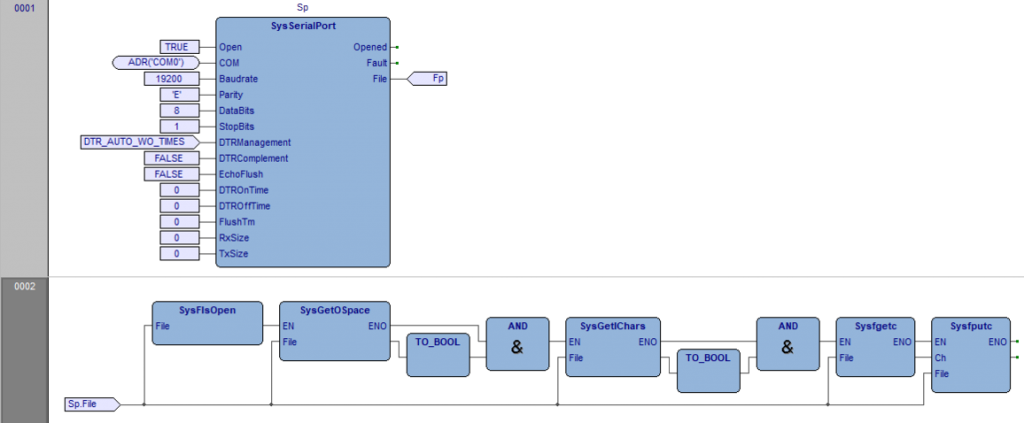
Oltre al programma di esempio ST_SerialDataReceive riportato in testa all'articolo rimando al programma ST_WindSonicDriver. Entrambi questi programmi aiutano a capire nel dettaglio come gestire le comunicazioni seriali.Negli esempi seguenti viene aperta una porta di comunicazione seriale e viene eseguito l'echo dei caratteri ricevuti.
LogicLab (Ptp116), FBD_SysSerialPort
PROGRAM FBD_SysSerialPort
VAR
    Sp : SysSerialPort; (* Serial port management *)
END_VAR
LogicLab (Ptp116), ST_SysSerialPort
PROGRAM ST_SysSerialPort
VAR
    Ch : INT; (* Auxiliary variable *)
    Sp: SysSerialPort; (* Serial port management *)
END_VAR

// *****************************************************************************
// PROGRAM "ST_SysSerialPort"
// *****************************************************************************
// This program echoes the characters received by the serial line.
// -----------------------------------------------------------------------------

    // -------------------------------------------------------------------------
    // INITIALIZATION
    // -------------------------------------------------------------------------

    IF (SysFirstLoop) THEN
        Sp.COM:=ADR('COM0'); //COM port definition
//      Sp.COM:=ADR('/dev/ttyAMA0'); //COM port definition
//      Sp.COM:=ADR('/dev/ttyUSB0'); //COM port definition
        Sp.Baudrate:=19200; //Baudrate
        Sp.Parity:='E'; //Parity
        Sp.DataBits:=8; //Data bits
        Sp.StopBits:=1; //Stop bits
        Sp.DTRManagement:=DTR_AUTO_WO_TIMES; //DTR management
        Sp.DTRComplement:=FALSE; //DTR complement
        Sp.EchoFlush:=FALSE; //Received echo flush
        Sp.DTROnTime:=0; //DTR On time delay (mS)
        Sp.DTROffTime:=0; //DTR Off time delay (mS)
        Sp.FlushTm:=0; //Flush time (mS)
        Sp.RxSize:=0; //Rx buffer size
        Sp.TxSize:=0; //Tx buffer size
    END_IF;

    // -------------------------------------------------------------------------
    // ECHOES CHARACTERS
    // -------------------------------------------------------------------------
    // Here the received characters are echoed back.

    Sp(Open:=TRUE); //Serial port management
    IF (Sp.Opened) THEN
        IF ((SysFGetOSpace(Sp.File) > 0) AND (SysFGetIChars(Sp.File) > 0)) THEN
            Ch:=Sysfgetc(Sp.File); //Get input character
            Ch:=Sysfputc(Ch, Sp.File); //Put input character
        END_IF;
    END_IF;

// [End of File]
CODESYS (Ptp161), ST_SysSerialPort
PROGRAM ST_SysSerialPort
VAR
    FirstLoop: BOOL := TRUE; // First execution loop
    Ch : INT; //Auxiliary variable
    Sp: SysSerialPort; //Serial port management
END_VAR

// *****************************************************************************
// PROGRAM "ST_SysSerialPort"
// *****************************************************************************
// This program echoes the characters received by the serial line.
// -----------------------------------------------------------------------------

    // -------------------------------------------------------------------------
    // INITIALIZATION
    // -------------------------------------------------------------------------
    // Initialize the serial port.

    IF (FirstLoop) THEN
        FirstLoop:=FALSE; //First execution loop
        Sp.pCOM:=ADR('1'); //COM port definition
        Sp.Baudrate:=19200; //Baudrate
        Sp.Parity:='E'; //Parity
        Sp.DataBits:=8; //Data bits
        Sp.StopBits:=1; //Stop bits
        Sp.DTRManagement:=DTR_MODE.DTR_AUTO_WO_TIMES; //DTR management
        Sp.DTRComplement:=FALSE; //DTR complement
        Sp.EchoFlush:=FALSE; //Received echo flush
        Sp.DTROnTime:=0; //DTR On time delay (mS)
        Sp.DTROffTime:=0; //DTR Off time delay (mS)
        Sp.FlushTm:=0; //Flush time (mS)
        Sp.RxSize:=0; //Rx buffer size
        Sp.TxSize:=0; //Tx buffer size
    END_IF;

    // -------------------------------------------------------------------------
    // ECHOES CHARACTERS
    // -------------------------------------------------------------------------
    // Here the received characters are echoed back.

    Sp(Open:=TRUE); //Serial port management
    IF (Sp.Opened) THEN
        IF ((SysFGetOSpace(Sp.File) > 0) AND (SysFGetIChars(Sp.File) > 0)) THEN
            Ch:=Sysfgetc(Sp.File); //Get input character
            Ch:=Sysfputc(Ch, Sp.File); //Put input character
        END_IF;
    END_IF;

// [End of File]